
Detailed Overview
In a home golf simulator, the projector's job isn't just to make a picture, it has to survive being mounted close to a hitting bay and still throw an image large enough to feel like a real course. Its bright, accurate color output, the kind praised for general home entertainment use, translates directly to simulator screens: launch monitor software and course graphics need punchy, well-saturated color to read clearly, especially at the distances players stand from the impact screen. Because garages and basements used for simulator builds are frequently lit rather than pitch dark, having a picture mode built around high brightness for gaming matters more here than it would in a dedicated home theater room. The projector doesn't need to compete with cinema-grade black levels in this context, it needs to stay legible and visible against ambient light while tracking fast-moving footage of a golf swing without noticeable lag. Pair it with an impact screen, a launch monitor, and simulator software, and the short-throw lens becomes the enabling piece: it lets the unit sit close enough to the screen to avoid being struck by a club or casting a shadow across the display, while still filling a course-sized image in a space most homeowners would never consider for a full theater setup.
Specifications Explained
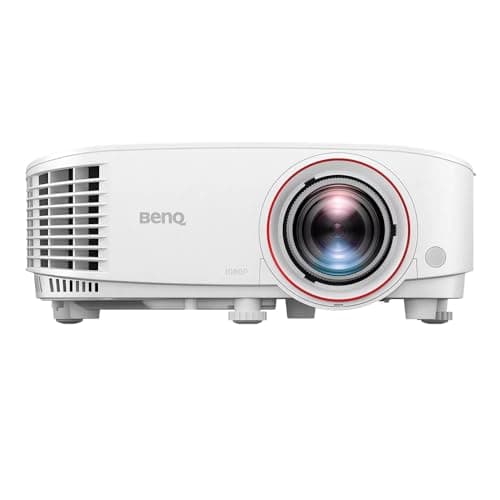
The physical dimensions matter more than they might seem for anyone planning a home simulator setup. At roughly 11.65 inches long, 9.5 inches tall, and 4.6 inches wide, and weighing just under 6 pounds, this projector is small and light enough to ceiling-mount without needing reinforced brackets or worrying about structural stress on drywall, which is a real consideration in dedicated sim rooms with limited joist access. The listing covers a single unit, so factor in separately buying any mount, screen, or impact-resistant enclosure a simulator setup typically requires; nothing extra is bundled in. The release date puts this model's design several years back, which is worth noting because it means the internal tech, menu systems, and connectivity reflect an older generation rather than a current one. That doesn't automatically make it a bad fit, but buyers should calibrate expectations around its age rather than assume newer feature sets.
Real-World Considerations
Community and review sentiment on real-world use is thinner than on specs, and what exists points in a mixed direction. On the connectivity side, at least one modern review flags the lack of USB-C as a real drawback, noting that current setups increasingly lean on USB-C for both video and power, so anyone building around a laptop or phone-first workflow may find the port selection dated. Treat these as data points rather than a verdict: the research here comes from a handful of detailed write-ups rather than a broad chorus of owners, so it's worth weighing against your own room, source devices, and how much you value newer connectivity standards before deciding it fits your setup.
Alternatives Worth Considering
There isn't specific data here on named competing projectors, so I can't point you to particular models, but the trade-offs are clear enough from what the research does show. If you want a true home-theater-grade image with deeper blacks and better contrast for movie nights in a dedicated dark room, this isn't the pick: it's built and priced as a budget short-throw unit, not a premium display, and picture depth suffers in darker scenes. If USB-C is a dealbreaker for your setup, that's a real gap here too, and something worth checking on newer projectors before you buy. On the other hand, if what you actually need is a projector that's easy to place in a tight bedroom or living room, throws a big image from close range, and handles gaming with low lag, this stays competitive on value against pricier short-throw alternatives. Think of it as the practical, budget-conscious choice rather than the high-end one.
Buying Advice
If you're tight on space, this is where the TH671ST earns its keep: the short-throw lens lets you fill a screen from a couple feet away, so a small bedroom or apartment living room isn't a dealbreaker. Gamers chasing responsiveness over reference-grade color will likely be happiest here; home theater purists who care about deep blacks and rich contrast in a dedicated dark room should look elsewhere, since measurement-based testing puts it below premium projectors on that front. Skip it if USB-C is a must for your setup, since it isn't included. As for golf simulator use, the evidence on hand doesn't settle that question either way, so don't buy based on that alone. Check Amazon for current pricing and stock before deciding, and note it ships in a single color option.
Considering it? Check the price of BenQ TH671ST 3000 Lumens 1080p Short Throw Home Entertainment Projector
$949.00 on Amazon
Frequently Asked Questions
How easy is it to position and set up the BenQ TH671ST in a small room?
Setup is one of its more consistently praised traits: the short-throw lens lets it sit close to the wall or screen and still fill a large image, which is why it keeps coming up as a practical option for bedrooms, small living rooms, and tight gaming setups where a long-throw projector simply wouldn't fit.
Does the BenQ TH671ST have USB-C connectivity, and is its absence a significant drawback?
It does not include USB-C, and some buyers comparing it against newer projectors and displays call that omission an outdated part of the connectivity lineup. Whether it actually matters comes down to what devices you plan to connect.
Editorial Verdict
Weigh the evidence and the TH671ST earns its keep as a budget short-throw pick rather than a home-theater centerpiece. Its short-throw lens genuinely simplifies setup in tight bedrooms or living rooms, and reviewers consistently point to low input lag and solid 1080p color as reasons gamers and casual viewers like it as a TV replacement. The tradeoff is real: contrast and black levels lag behind, so serious film watchers chasing deep shadow detail should look elsewhere, and the missing USB-C input is an inconvenience for anyone building a modern setup. At $700-800, though, it's hard to beat for someone who mainly wants a big, bright, responsive gaming and casual-viewing image without spending on a premium unit.