
Detailed Overview
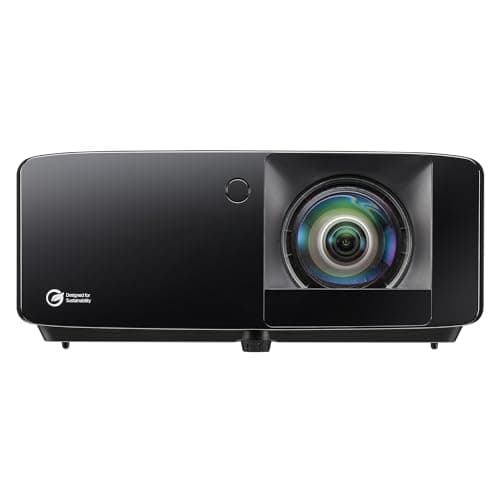
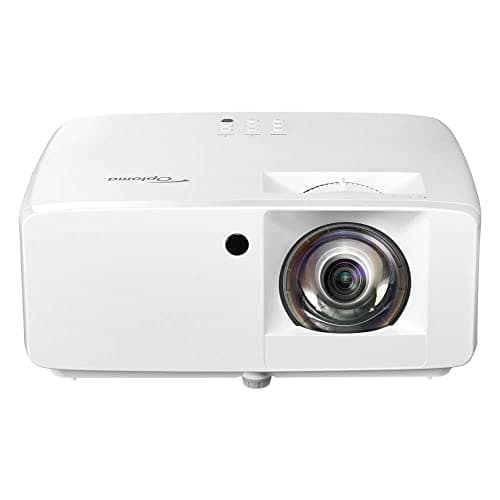
In a simulator build, the projector is the piece that turns swing data into something you actually watch: the ball flight, the course rendering, the practice overlays from whatever software you're running. This unit brings a 1080p panel and a 3500-lumen output, which matters more in a garage or spare room than a dedicated home theater, since simulator spaces rarely have full light control and the image has to compete with windows, overhead lighting, or an open garage door. Resolution also counts for something specific here: at simulator throw distances onto an impact screen, a 1080p source keeps HUD elements, scorecards, and course textures legible rather than muddy.
Its short-throw optics, already noted for fitting smaller rooms, are really what make it usable in a simulator enclosure in the first place, since most golf setups don't have the ceiling height or back wall distance a standard-throw projector wants. That single spec ties the whole unit to this use case more than any other. Pair it with an impact screen, hitting mat, and launch monitor, and the projector's job is simply to keep pace visually without becoming the bottleneck. It ships in white, and as of its 2023 release it remains a straightforward, no-frills option in that role rather than a flagship home theater display.
Specifications Explained
The numbers that matter most here are the physical ones. At 9.6 pounds and roughly 8.5 inches tall, 4.49 inches deep, and 10.79 inches wide, this projector is light and compact enough to ceiling-mount above a hitting bay or set on a shelf behind the screen without needing reinforced hardware. That matters in a simulator room where space is tight and throw distance is fixed, since a bulky or heavy unit limits where you can position it relative to the impact screen. The compact footprint also makes it easier to tuck into an enclosure or golf net frame without the projector protruding into your swing path. Worth noting: the listing covers a single unit, so mounting hardware, a screen, or an enclosure aren't included and need to be sourced separately. When planning your simulator layout, treat these dimensions as your starting point for figuring out mount placement and clearance before you commit to a screen size.
Real-World Considerations
Once you get past the spec sheet, a few patterns show up repeatedly in owner discussions. Color accuracy out of the box is the most consistent gripe: multiple reviewers describe the default picture as dull or inconsistent, needing manual adjustment before it looks right. That's not a dealbreaker, but budget time for calibration rather than expecting a great image straight out of the box. The menu and settings interface draws similar frustration, with people describing it as slow or clunky during setup, which compounds the color-tuning work since you're fighting the UI while trying to dial things in. Sentiment on these two points is fairly consistent across sources, so it's reasonable to plan around them rather than hope your unit is the exception. What the research doesn't cover in any depth is long-term reliability or how the projector holds up after months of regular use, so treat this as a snapshot of early ownership impressions rather than a verdict on durability.
Alternatives Worth Considering
The research gathered for this page doesn't include specific rival models, so I can't point to named alternatives with confidence. What I can say is based on where this projector sits. At $999, it's priced as a mid-range short-throw unit built for smaller rooms and golf-simulator setups, which narrows who it makes sense for. If your space allows for a longer throw distance and you don't need that compact placement flexibility, a standard-throw projector might give you more options at a similar price. If color accuracy out of the box matters more than convenience and you don't want to spend time calibrating, it's worth looking at models that don't require that adjustment step. And if overall image performance comparable to brighter units is the priority, this one already delivers that without a step up in brightness spec.
Buying Advice
If you have an oddly shaped room, the lens shift and keystone adjustment give you flexibility for off-center placement, which matters if a dedicated projector room isn't an option. It also handles varied aspect ratios, including 4:3 sources, so it's not locked into widescreen-only content. HDR10 and HLG are supported on paper, but if true HDR fidelity is your main priority, weigh that against other short-throw laser models in the same price bracket before committing. At $999 and currently in stock on Amazon, it's a reasonable pick for gaming and everyday viewing, less so if pixel-perfect HDR accuracy is the deciding factor.
Considering it? Check the price of Optoma GT2000HDR Ultra-Compact Short Throw Full HD Home Laser Projector
$999.00 on Amazon
Frequently Asked Questions
Does the GT2000HDR support HDR10 and HLG high dynamic range content?
Yes, it accepts both HDR10 and HLG sources. Real-world HDR quality is more debated than the spec sheet suggests, with some viewers reporting washed-out colors and flat exposure on HDR material, so don't expect dramatic pop without some manual picture adjustment.
Can the GT2000HDR be installed off-center and adjusted with lens shift or keystone?
Yes, it includes lens shift along with keystone correction, so it doesn't need to sit dead-center to the screen. That's genuinely useful in smaller rooms or golf-simulator-style setups where a perfectly straight throw isn't an option.
Does the GT2000HDR support different aspect ratios and how does it handle 4:3 content?
A bit of setup tinkering pays off here.
How does it compare to other short-throw laser projectors in its price range?
The available evidence doesn't give a direct side-by-side comparison against competing short-throw laser models, so that's not something I can answer with confidence rather than guesswork.
Editorial Verdict
The GT2000HDR earns its reputation mainly on practicality: the short-throw design lets it throw a big image in a tight room, which is exactly why golf-simulator owners keep recommending it. Gaming feel and brightness get generally positive word-of-mouth too, though some of that praise comes with caveats about optimistic lumen claims and less accurate picture modes. Where it consistently falls short is out-of-the-box color tuning and a clunky menu system that makes calibration more tedious than it should be. If you're willing to spend time dialing in settings, it can look genuinely good, particularly with 1080p content. For anyone prioritizing space efficiency and simulator use over plug-and-play color accuracy, it's a reasonable pick; buyers who want accurate color immediately should look elsewhere.