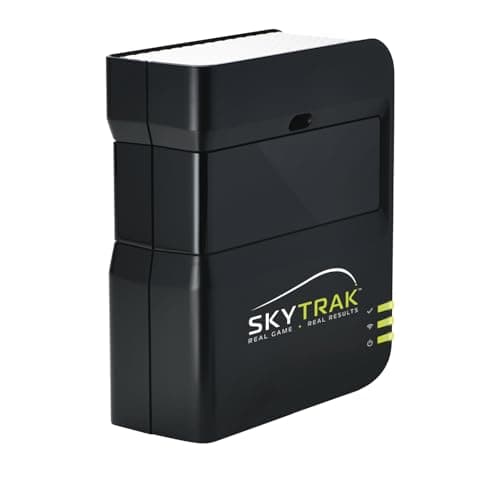

Detailed Overview
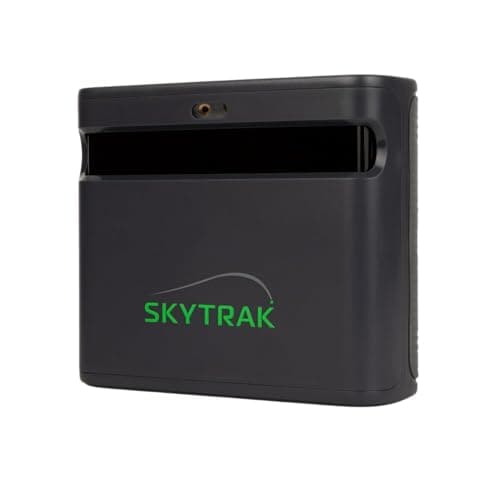
In a home simulator build, this unit is the data engine sitting between your swing and everything downstream: the projector, screen, and software that turn a physical shot into an on-screen result. It reads ball flight the moment you strike, then hands that data off to whatever simulation software you're running, which is where the actual course play, target ranges, and skills challenges happen. Because it relies on optical sensors rather than radar, it wants a controlled indoor environment; consistent lighting matters more here than with radar-based units, and results can get shaky if you try to use it outdoors or in direct sun, so plan your enclosure and lighting setup accordingly. On the software side, it plugs into established simulation ecosystems with structured practice modes, bag mapping, and games, giving the hardware a reason to stay relevant beyond just spitting out numbers. Worth knowing before you build your system: getting it talking to a PC or tablet isn't always plug-and-play. Some setups need a specific USB cable or a small workaround to keep the connection stable, so it's worth budgeting a little patience, and maybe a spare cable, when wiring it into your simulator rig.
Specifications Explained
The numbers on the spec sheet here are modest, but they still tell you something useful. The unit measures 12 inches high, 9 inches long, and 18 inches wide, which matters because it tells you how much clear space you need on a shelf, tripod, or floor mount in a home hitting bay. This isn't a large footprint, so it should tuck into most garage or basement setups without demanding a dedicated room. It ships as a single item in black, so don't expect a bundled case, mat, or net in the box: budget for those separately if your space needs them. Beyond size and count, the supplied specifications don't cover the details that actually decide whether a launch monitor is worth buying, things like ball data accuracy, spin capture, or software compatibility. If those factors matter to your decision, you'll need to look at hands-on testing rather than the spec sheet alone.
Real-World Considerations
Community feedback largely echoes what reviewers already noted, but a few recurring themes are worth flagging before you buy. The most consistent complaint across forums and user threads is a noticeable lag, often a couple of seconds, between impact and when ball flight data appears on screen. It doesn't affect the accuracy of the numbers, but some golfers find it breaks the rhythm of simulator play. Users also report occasional missed or misread shots, especially when ball placement or setup isn't precise, so consistent results depend on getting your hitting area dialed in. On the cost side, several buyers mention that the annual subscription needed to unlock simulation and game-improvement features adds up over time, and that a protective case isn't included, meaning extra spend if you want one. Sentiment on day-to-day satisfaction is generally positive, though it leans on a mix of retail reviews and forum chatter rather than one dominant source, so treat it as a pattern rather than a guarantee.
Alternatives Worth Considering
If most of your practice happens outdoors or in a bay with inconsistent light, a radar-based launch monitor is worth a look instead: those units hold up better in bright sunlight and outdoor conditions where SkyTrak's camera-based system can struggle. If dead-on alignment and setup precision matter more to you than price, a pricier commercial-grade launch monitor may suit you better, since some buyers find getting SkyTrak perfectly square to the target line fussier than they'd like. Golfers chasing the lowest possible cost or a premium flagship system should know our research here doesn't cover specific competing models by name or price, so we can't point you to an exact alternative, only flag that cheaper and more expensive tiers exist in this category depending on how much accuracy and polish you're willing to pay for.
Buying Advice
SkyTrak makes the most sense if you're setting up a home or garage practice space with consistent, controllable lighting: indoor accuracy is reportedly strong, but several users report shakier performance outdoors or in bright sun, so it won't replace a radar-based unit for range sessions. Factor in ongoing costs too, since much of the simulator and game-improvement functionality sits behind an annual subscription, and a protective case isn't included, so add that to your budget. If a couple seconds of lag between contact and on-screen ball flight would bother you during simulator rounds, or if occasional missed reads on mishits are a dealbreaker, weigh that before committing. For golfers who mainly want dependable numbers across the bag with a simple setup and are comparing it against pricier commercial monitors, it's a reasonable contender as long as you accept those trade-offs going in.
Considering it? Check the price of SKYTRAK Golf Launch Monitor | Photometric Technology for Ball Speed, Carry & Total Distance, Spin Rates, Launch & Shot Shape Data | Golf Simulator & Practice
$529.00 on Amazon
Frequently Asked Questions
How accurate is SkyTrak's ball data compared to more expensive commercial launch monitors?
Reviewers consistently describe the ball speed, carry, total distance, spin, launch angle and shot shape readings as comparable to pricier commercial units, which is why many treat it as a reliable tool for practice and game improvement rather than a toy.
Is SkyTrak easy to set up and use for home practice?
Most people who write about it call the setup straightforward and the companion app user-friendly, and that ease of use is a big reason it fits well into a home hitting area, coaching sessions, or solo practice.
What is the general sentiment about SkyTrak on golf simulator forums and Reddit?
Overall it leans positive, with users pointing to strong value against professional launch monitors and to how simple it is to move and set up.
Editorial Verdict
SkyTrak earns its reputation as a serious practice tool because the ball data holds up: distance, spin, and shot shape numbers that reviewers say rival launch monitors costing far more. That accuracy, paired with genuinely engaging simulator software and a setup light enough to move between rooms, is what makes it worth the price of entry for a dedicated player. The tradeoffs are real but manageable: alignment takes more care than some rivals demand, a brief lag shows up between impact and the on-screen flight, and you'll want to budget for a case and the subscription if you want the full simulation experience. None of that undercuts the core strength. For golfers who practice indoors and want trustworthy numbers over flashy extras, this is money well spent.